AI for People Who Hate Tech
If you hate computers, the words "download" and "sign up" make you tense, and your kids set up your email — this lesson is for you. Quiet pace. No jargon.
If you bought a smartphone reluctantly, never figured out the cloud, and have been ignoring AI because it sounds like one more thing — this lesson is for you. Take your time. Read it slowly. Nothing here will break.
A quiet promise
You don’t have to become “a tech person.” You don’t have to learn anything you don’t want to. By the end of this page, you’ll know what AI actually is, you’ll have used it for one useful thing, and you can stop there if you want to.
That’s allowed.
The simplest possible explanation
You know how when you text someone, you write a message and they write back? AI is like texting — except instead of texting your daughter or your friend, you’re texting a very patient assistant who has read most of the books, articles, and websites in the world.
You ask. It writes back.
That’s the whole thing. Everything else is a small detail.
The two questions everyone has
”Is it safe?”
The big AI tools — ChatGPT, Claude, Gemini — are made by serious companies with reputations to protect. They are safe to use the way email is safe to use: not perfect, but used by hundreds of millions of normal people every day.
What you should know:
- Don’t paste in your social security number, your bank passwords, or your full medical records. Same rule as the rest of the internet.
- You can delete your conversations. They have a delete button.
- You don’t have to give it your phone number to use most of them. An email address is enough.
”Will I break something?”
No. There is no button you can press that will hurt your computer, hurt the AI, or get you in trouble. The worst case is the AI gives you a bad answer. You close the tab. Nothing happens.
A 10-minute walkthrough
Get a cup of coffee. Sit down. Have your phone or computer nearby. Read this slowly.
Step 1 — Open a web browser
That’s the thing you use to go on the internet. On a computer, it might be called Chrome, Safari, Edge, or Firefox. They all work.
Step 2 — Go to one website
In the address bar at the top, type:
Or just click that link and your browser will take you there.
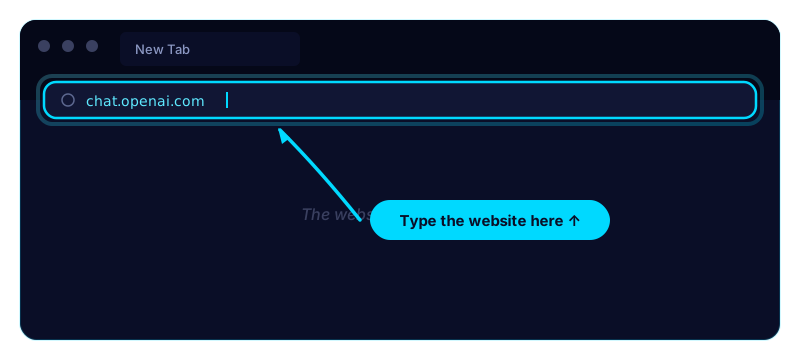 Wait for the page to load. You’ll see a sign-up button. Click it. Enter your email and a password. (Pick a password you’ll remember. Write it down on paper if you need to. That’s allowed.)
It might ask for your phone number. You can give it or you can use Apple/Google sign-in if you prefer not to.
Step 3 — You’re in
You’ll see a screen with a big empty box at the bottom. That box is where you type. The screen above it is where the AI’s reply will appear.
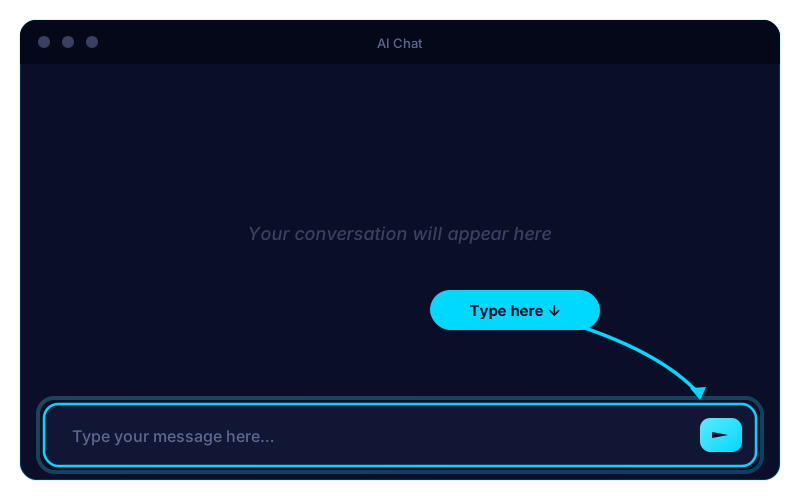
That’s it. That’s the whole tool.
Step 4 — Type something useful to you
Don’t try to test it with a trick question. Don’t try to break it. Type something that would actually help you. Here are three to pick from:
Explain how Medicare Part D works to me like I’m intelligent but not a doctor. Use a real-life example.
Or:
I want to plant a small tomato garden in containers on my back porch. Walk me through what to buy, when to start, and how to keep them alive. I live in [your state]. I have never gardened before.
Or:
Help me plan a birthday card message for my [grandson / sister / friend] who is turning [age]. Make it warm and not corny. They like [hobby].
Send it. Read what comes back. If it’s not quite right, type back like you’d reply to a person:
That’s a little long. Make it shorter and more warm.
Or:
Use simpler words.
Or:
I don’t understand the third step. Explain it again differently.
It will rewrite. That’s the point.
The mindset that makes this easy
Here’s what works for most folks who feel intimidated by tech:
Treat AI like a polite assistant, not a computer program. You don’t need a special way of talking. You don’t need to know “the right command.” You can be vague and conversational. You can ramble. You can change your mind.
It’s okay to not know. If a word in its reply confuses you, type back: “What does [that word] mean?” It will explain. You can ask anything. There is no wrong question.
You can stop and start. Walk away mid-conversation. Come back tomorrow. Open a fresh chat anytime — every conversation is independent.
What you’re allowed to ignore
Other people will tell you about “prompts,” “models,” “APIs,” “agents,” “GPT-4,” “Claude 3,” “tokens,” and a hundred other words. You can ignore all of that. None of it matters for the basic thing you’d want to use AI for.
If you want to learn more later, you can. The Beginner Track here will walk you through it slowly. But you’re not behind by ignoring the jargon. You’re ahead, because you can actually use the tool.
A small assignment
Today — ideally in the next hour — open the chat and ask it for help with one real thing in your life. Don’t pick the hardest thing. Pick something small. A recipe. A reply to a confusing letter. A book recommendation.
When the answer comes back, read it. Reply if it’s not quite right. Stop when you have what you need. Close the tab.
You used AI. You can do this. The rest is just doing more of the same thing.
Where to go next
If you’re ready, Lesson 03 — Your First Prompt → walks through writing your very first request to AI in five small steps.
If you want a reference instead, the Glossary is every word you’ll hear about AI, in plain English, on one page. Bookmark it.
You can also go back to the Beginner Track home and pick whatever lesson sounds most useful to you. There’s no wrong order.
Get the next lesson